Media Annotation Pins
A free image review component for numbered notes on a caller-supplied image.
Review two image proofs
Each example keeps its accepted note in caller-owned local state. Turn off acceptance to see a declined request leave the selected note in place.
Workshop label proof
Review trim, heading clearance and closely spaced colour transitions.
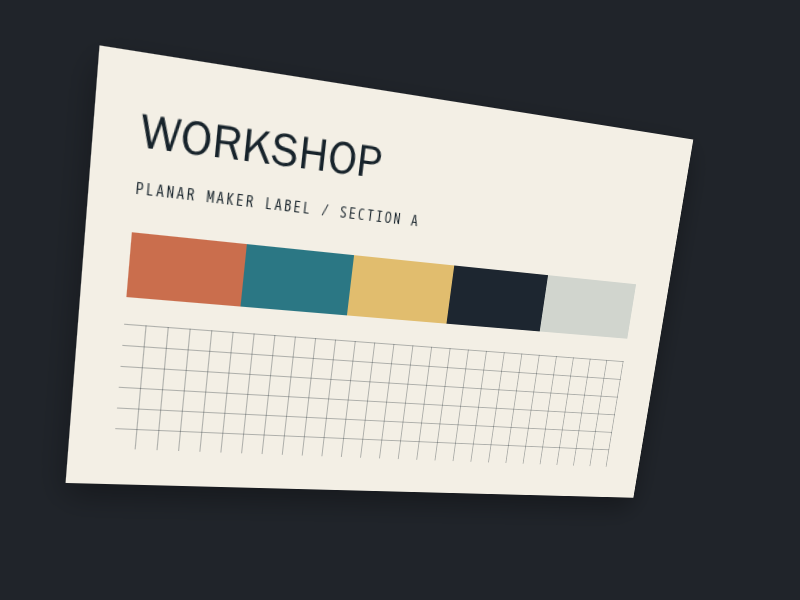
Selected: Heading clearance
- 01Outer trim
Check that the upper-left cut leaves the label stock visible
- 02Heading clearanceSelected
The WORKSHOP heading should keep its gap from the angled top edge
- 03Colour strip
Confirm the terracotta block begins at the approved guide
- 04Swatch boundary
Review the closely spaced first colour transition in the original proof
Initial review note supplied by the caller.
Editorial cover proof
Review the edition line, title rhythm and cover details.
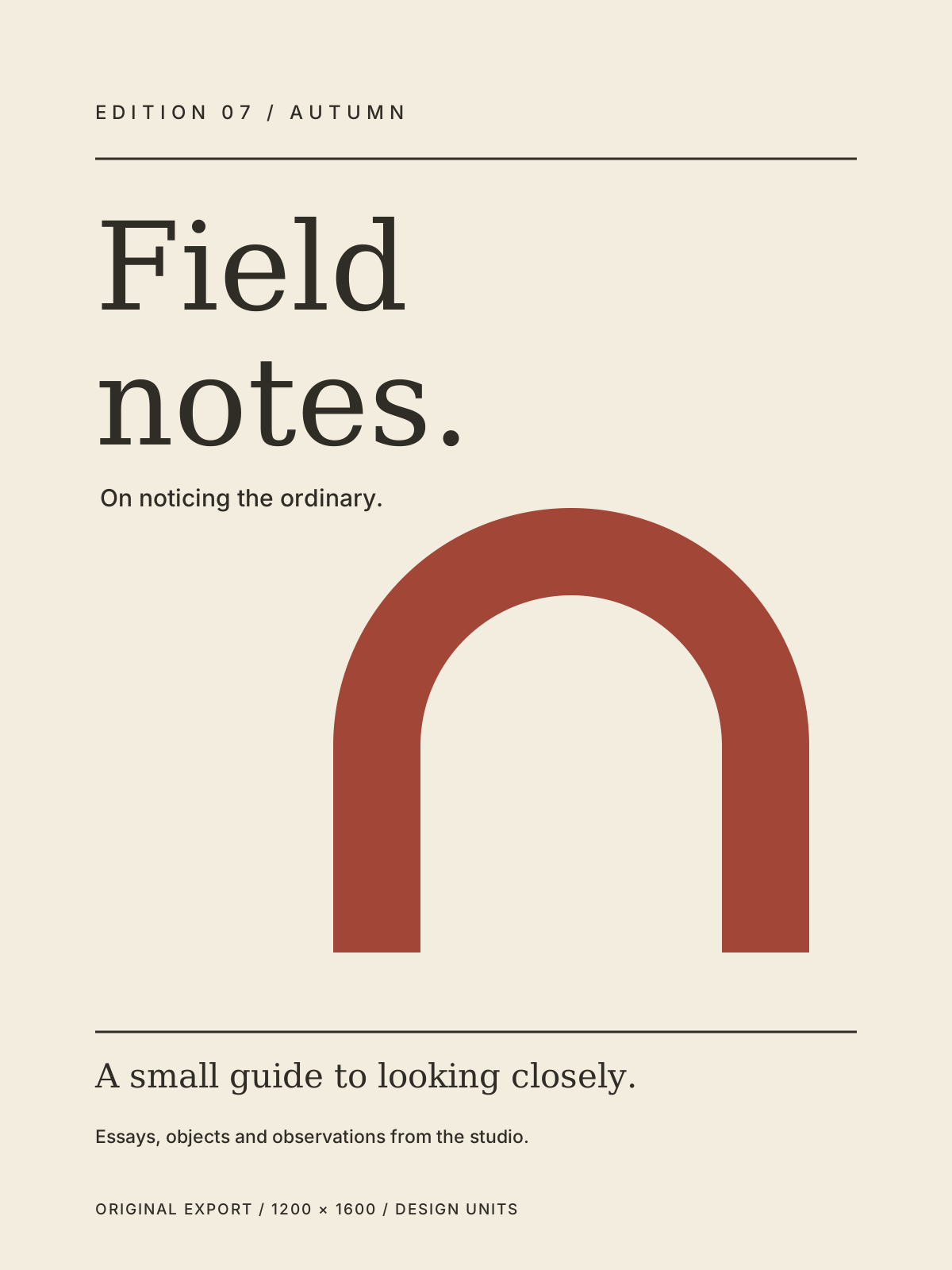
Selected: Title baseline
- 01Edition line
Check the tracked edition line before export
- 02Title baselineSelected
The second title line sets the main reading rhythm
- 03Arch crown
Confirm the arch remains clear of the supporting line
- 04Footer rule
The rule must finish at the same right margin as the edition line
Initial review note supplied by the caller.
Customise
Code
"use client";

import { MediaAnnotationPins } from "@/components/media-annotation-pins";

const source = {
  key: "workshop-proof-v1",
  src: "/media-annotation-pins/workshop-proof.png",
  alt: "Workshop label print proof showing a heading and colour strip",
  width: 800,
  height: 600,
};
const annotations = [
  { id: "trim", label: "Outer trim", detail: "Check the upper-left cut leaves the stock visible", x: 0, y: 0 },
  { id: "heading", label: "Heading clearance", detail: "Keep the heading clear of the angled top edge", x: 143, y: 129 },
];
const value = { sourceKey: source.key, id: "heading" };

// This read-only snapshot needs no callback. Add onValueChange and accept its request by updating value.

<MediaAnnotationPins
  source={source} annotations={annotations} value={value}
/>
Place numbered review notes on a caller-supplied image, then select them through accessible pins and a complete ordered note list.
Media Annotation Pins is a free React component for reviewing image proofs and editorial artwork. Your application owns the image, note content and accepted selection; the component keeps every valid note available in the ordered list, including notes whose nearby positions share a grouped pin.
Install
Add the @te registry to your components.json once:
{
  "registries": {
    "@te": "https://templateempire.io/r/{name}.json"
  }
}
Then install the component:
npx shadcn@latest add @te/media-annotation-pinsUsage
"use client";

import { useState } from "react";
import { MediaAnnotationPins, type MediaAnnotationPinsProps } from "@/components/media-annotation-pins";

const source = {
  key: "workshop-proof-v1",
  src: "/media-annotation-pins/workshop-proof.png",
  alt: "Workshop label print proof showing a heading and colour strip",
  width: 800,
  height: 600,
} satisfies MediaAnnotationPinsProps["source"];
const annotations = [
  { id: "trim", label: "Outer trim", detail: "Check the upper-left cut leaves the stock visible", x: 0, y: 0 },
  { id: "heading", label: "Heading clearance", detail: "Keep the heading clear of the angled top edge", x: 143, y: 129 },
] satisfies MediaAnnotationPinsProps["annotations"];

export function Example() {
  const [value, setValue] = useState<MediaAnnotationPinsProps["value"]>({ sourceKey: source.key, id: "heading" });
  return <MediaAnnotationPins source={source} annotations={annotations} value={value}
    onValueChange={setValue} />;
}
Props
| Prop | Type | Default | Description |
|---|---|---|---|
| source | { key; src; alt; width; height } | required | key identifies one immutable image generation. Change it whenever image bytes, URL, orientation, design extents or note coordinate basis changes. src must be a root-relative path or absolute HTTPS URL without credentials, fragment, whitespace, controls or backslashes. alt is nonblank plain text. Width and height are finite design units from 0.001 to 1,000,000; valid points include the closed bottom-right edge. |
| annotations | readonly { id; label; detail; x; y }[] | required | Supply 2 to 12 ordered notes. IDs are unique nonblank keys; labels and detail are plain text. A point is continuous and must be finite inside 0..width and 0..height. Invalid rows remain visible with an explanation and cannot be selected; invalid positions have no pin. |
| value | { sourceKey; id } | null | required | The parent-owned accepted selection. Both sourceKey and id must match a current valid note. A stale value is shown as unavailable; the first note is never selected as a fallback. Selecting the accepted note requests null to clear it. |
| onValueChange | (request: { sourceKey; id } | null) => void | undefined | Requests a selection or clear. The parent decides whether to accept it. Without this callback the component is read-only and exposes no inactive action buttons. |
| className | string | undefined | Optional utilities merged onto the root figure. The complete image retains its source ratio and the component reserves a 26px or 30px pin gutter as note density requires. |
Customisation
The leaf exposes only these five props and uses native buttons. Grouped pins move focus to the first matching note action; each note stays independently selectable from the ordered list. Overlay pins appear only after hydration, successful image load, ratio verification and finite usable geometry. If enhancement is unavailable, use the complete list. Reduced motion, forced colours and print keep selection static. The accepted halo moves only after a matching parent value update and only while source, ordered notes, coordinates and image geometry remain unchanged. The component does not persist notes or image data. Scoped aliases can be restyled with --annotation-pins-ink, --annotation-pins-surface, --annotation-pins-border, --annotation-pins-accent and --annotation-pins-ring. For the bundled examples, copy public/media-annotation-pins/workshop-proof.png and public/media-annotation-pins/edition-cover-proof.svg to the same paths under your public directory. These byte-identical originals are optional examples; the leaf accepts any caller-supplied safe image URL.
.review-surface {
  --annotation-pins-ink: var(--foreground);
  --annotation-pins-surface: var(--background);
  --annotation-pins-border: var(--border);
  --annotation-pins-accent: var(--primary);
  --annotation-pins-ring: var(--ring);
}

/* Add className="review-surface" to MediaAnnotationPins. */
Frequently asked questions
- Is Media Annotation Pins free for commercial use?
- Yes, for personal and commercial projects under the repository's MIT licence with the Commons Clause condition. Keep the required copyright, licence and Commons Clause notices in source. Distributing these components as a component library requires a separate agreement. See LICENCE.md for the complete terms.
- Can I use the note list when pins are unavailable or JavaScript is disabled?
- Yes. Server output includes the source image, original-image link and complete ordered note text. Selection actions appear after hydration. If image loading, ratio, geometry or browser enhancement checks fail, the list remains available and explains that pin enhancement is unavailable.
- Does the component save notes or accept a selection automatically?
- No. Your application supplies the image, ordered annotations and accepted value. A pin or note action only requests a value; update value in your parent to accept it. The component does not persist review data.