Media Pixel Sampler
A free source-pixel image review component for Next.js and React.
01 / Studio QA journal
North Desk action blue
Review the named opaque action pixel in a fictional 800 by 600 interface export.
- Reference source cell
- 120, 160
- Review purpose
- Brand colour
The initial reference cell is the named action blue. Browser readback reports the current accepted source pixel.
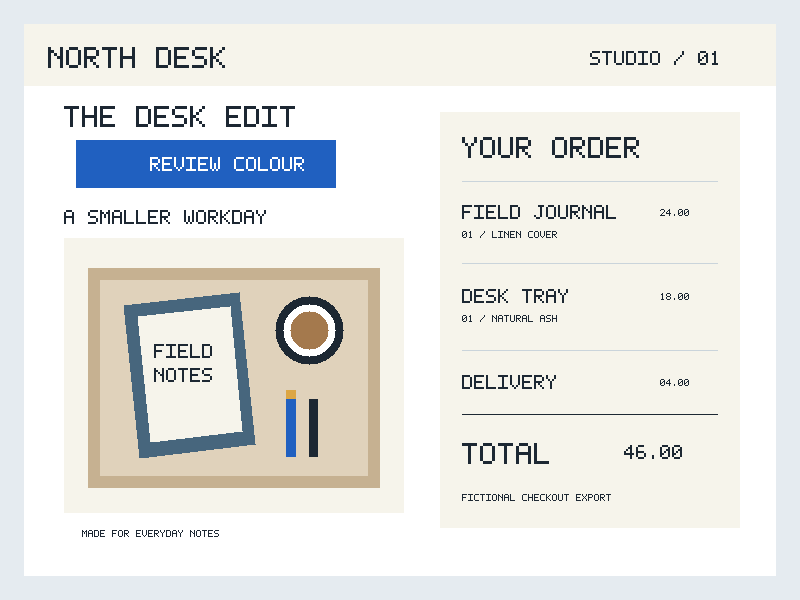
Caller fallback image. Source pixels have not been verified.
The acceptance checkbox controls whether Apply updates the saved pixel. The original image link remains available if sampling is unavailable.
02 / Transport proof card
Marker edge alpha
The 64 by 64 marker has an opaque body, a partially transparent edge at (31, 32), and a fully transparent corner at (0, 0). Readback reports browser RGBA bytes, including alpha zero.
- Reference source cell
- 31, 32
- Review purpose
- Edge transparency
Compare opaque, partial and transparent source pixels. Transparent RGB is not a promise about encoded hidden channels.

Caller fallback image. Source pixels have not been verified.
The acceptance checkbox controls whether Apply updates the saved pixel. The original image link remains available if sampling is unavailable.
Customise
Code
"use client";

import { MediaPixelSamplerDemo } from "@/components/demo";

// Copy the two original demo PNGs to public/media-pixel-sampler first.
// Registry installation supplies source files, not those caller-owned binaries.

<MediaPixelSamplerDemo />
Media Pixel Sampler is a free image and media component for Next.js and React, styled with Tailwind. It relates one caller-accepted integer coordinate to the actual RGBA bytes returned by browser canvas readback from a verified source Blob.
Native Column and Row fields are the complete editing path. Qualified image placement is optional, and the caller decides whether to accept each request. The original image link remains available when sampling cannot run.
Install
Add the @te registry to your components.json once:
{
  "registries": {
    "@te": "https://templateempire.io/r/{name}.json"
  }
}
Then install the component:
npx shadcn@latest add @te/media-pixel-samplerUsage
"use client";

import { useEffect, useState } from "react";
import { MediaPixelSampler, type MediaPixelSamplerValue } from "@/components/media-pixel-sampler";

// Copy your own admitted PNG to public/media-pixel-sampler/proof.png first.
const path = "/media-pixel-sampler/proof.png";

export function PixelReview() {
  const [blob, setBlob] = useState<Blob | null>(null); // SSR and initial render
  const [value, setValue] = useState<MediaPixelSamplerValue | null>(null);
  useEffect(() => {
    const controller = new AbortController();
    async function load() {
      try {
        const response = await fetch(path, { signal: controller.signal });
        if (!response.ok || !response.body) return;
        const reader = response.body.getReader();
        const parts: Uint8Array<ArrayBuffer>[] = [];
        let size = 0;
        try {
          for (;;) {
            const part = await reader.read();
            if (part.done) break;
            size += part.value.byteLength;
            if (size > 4194304) { await reader.cancel(); return; }
            parts.push(new Uint8Array(part.value));
          }
        } finally { reader.releaseLock(); }
        if (!controller.signal.aborted && size > 0)
          setBlob(new Blob(parts, { type: "image/png" }));
      } catch { /* The original remains available. */ }
    }
    void load();
    return () => controller.abort();
  }, []);
  return <MediaPixelSampler
    source={{ key: "proof-v1", blob, fallbackSrc: path, originalHref: path,
      alt: "Original interface proof with a blue primary action" }}
    value={value} onValueChange={setValue} label="Action colour review"
  />;
}
Props
| Prop | Type | Default | Description |
|---|---|---|---|
| source | MediaPixelSamplerSource | required | Caller-owned key, immutable Blob or null, safe fallbackSrc and originalHref, and meaningful alt. A new key or Blob reference starts a new verification. Fallback and original URLs are attributed but not verified against the Blob. |
| value | MediaPixelSamplerValue | null | required | Accepted { imageKey, column, row } with zero-based integers, or null. Drafts and RGBA never enter this prop. A matching tuple is sampled only after its current source is verified. |
| onValueChange | (request: MediaPixelSamplerValue) => void | undefined | Requests a complete coordinate on Apply or qualified image placement. The caller accepts by updating value, or refuses by leaving it unchanged. No callback gives read-only selection. |
| label | string | required | Visible figure name, 1 to 128 Unicode code points without ASCII controls. |
| caption | string | undefined | Optional supporting text, at most 512 code points without ASCII controls. |
| aspectRatio | number | 4 / 3 | Finite image box width-to-height ratio from 0.25 to 4. Invalid explicit values make sampling unavailable. |
| directPlacement | boolean | true | Enables a qualified native pointer shortcut on the verified image. Native coordinate fields remain available when placement is unavailable. |
| className | string | undefined | Additional root figure classes. Scoped pixel tokens inherit from the caller. |
Customisation
Provide one static noninterlaced PNG with 8-bit RGBA and an explicit sRGB tag; untagged PNGs are unavailable. Before browser decode, the native Blob size and single byte-read length must agree within 1 to 4,194,304 encoded bytes. The bounded admission check requires the PNG signature, exact chunk bounds and CRCs, no more than 1,024 chunks, and no trailing bytes. IHDR must be first, unique and 13 bytes: width and height 1 to 4,096, area at most 4,194,304 pixels, bit depth 8, colour type 6, and compression, filter and interlace values 0. Exactly one one-byte sRGB chunk with rendering intent 0, 1, 2 or 3 must precede IDAT. One or more consecutive IDAT chunks need a positive combined payload; IEND must be unique, last and zero-length. Only IHDR, sRGB, IDAT and IEND are permitted; other metadata or animation chunks are unavailable. This check does not inflate or decode IDAT: the browser must still decode the PNG and return verifiable sRGB RGBA8 readback. The output is canvas readback, not encoded hidden RGB, screen appearance, print colour or a contrast certificate. Alpha zero is a successful transparent sample. Unsupported formats, readback failure and unready bytes show unavailable text. The leaf never downloads an image: supply a Blob in a client effect and keep blob null on SSR. Registry installation delivers source files and utils only. For the two demo examples, separately copy interface-colour-proof.png and transit-marker-alpha-proof.png into your host's public/media-pixel-sampler directory, or use your own admitted PNGs and Blob source. Preserve native Column, Row, Apply, Revert and the original source link. The original link is a native keyboard and no-JavaScript alternative. Four inherited aliases allow a scoped theme without changing data pixels.
.pixel-review {
  --pixel-surface: var(--background);
  --pixel-ink: var(--foreground);
  --pixel-border: color-mix(in oklch, var(--foreground) 55%, var(--background));
  --pixel-focus: var(--ring);
}

/* Add className="pixel-review" or define these on an ancestor. */
Frequently asked questions
- Is Media Pixel Sampler free for commercial use?
- Yes, for personal and commercial projects under the repository's MIT licence with the Commons Clause condition. Keep the copyright, licence and Commons Clause notices in source. Distributing these components as a component library requires a separate agreement. See LICENCE.md for the full terms.
- What do the RGBA numbers and transparent samples mean?
- They are decimal browser canvas-sRGB readback bytes for the current accepted source pixel. Partial-alpha rounding and RGB at alpha zero do not recover encoded hidden channels. The sample does not certify display, print or contrast colour. Native fields and the original source link remain available when readback is unavailable.
- Are the PNG examples installed automatically?
- No. The registry installs the leaf, its private model, the portable demo and utils. Separately copy the two original PNGs into public/media-pixel-sampler, or supply your own eligible assets and Blob in a client component. The demo fetches only its documented root-relative caller paths in the browser; it starts with blob null on SSR.