Perspective Rectify
A free React image perspective tool with four explicit corners and a caller-accepted planar preview.
Print-room page proof
Choose four pixel centres and an explicit output size for a planar preview.
Draft edits and requests stay separate from the caller-accepted preview.
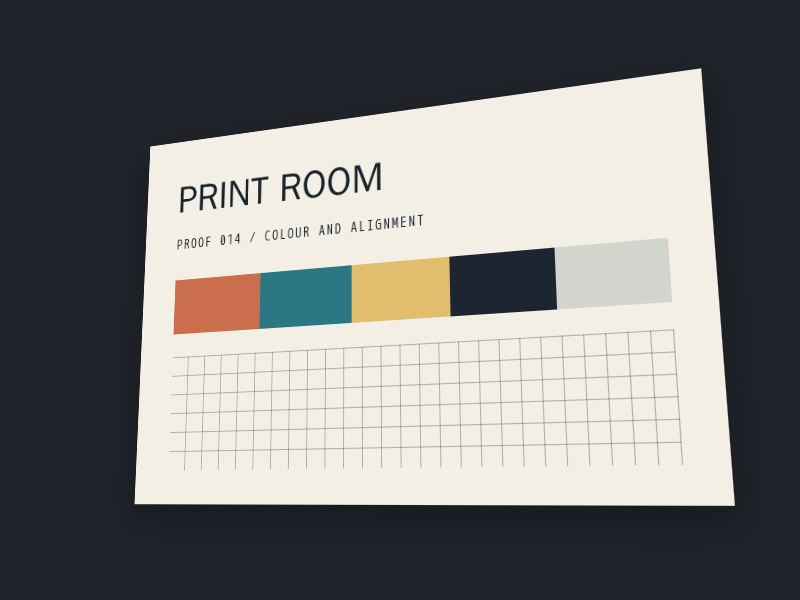
Original: Tilted print-room colour and alignment proof
Declared source: 800 by 600 intrinsic pixels.
Open original fileNo current accepted preview is available.
Accepted preview
600 by 400 output pixels. Source: Tilted print-room colour and alignment proof.
Transformed preview unavailable until enhancement runs.
Draft corners and output size
Coordinates are pixel centres. Origin is the top-left centre; x increases rightwards and y downwards. Use x from 0 to 799 and y from 0 to 599, with up to three decimal places. All ten fields are required for Preview.
Customise
Code
"use client";

import { useState } from "react";
import {
  MediaPerspectiveRectify,
  type MediaPerspectiveRectifyProps,
} from "@/components/media-perspective-rectify";

const source = {
  id: "page-proof",
  generation: "one",
  src: "/proof.png",
  alt: "Original page proof",
  width: 800,
  height: 600,
};

export default function PerspectiveReview() {
  const [value, setValue] = useState<MediaPerspectiveRectifyProps["value"]>(null);
  return (
    <MediaPerspectiveRectify
      label="Page proof"
      source={source}
      value={value}
      onValueCommit={setValue}
    />
  );
}

<PerspectiveReview />
Choose four pixel centres on an already oriented PNG and an explicit output size. Media Perspective Rectify requests that complete mapping when Preview is activated. The caller accepts it through value; a callback alone never replaces the accepted image.
The original file remains available while native fetch, decode and encoded-sRGB premultiplied-alpha sampling prepare the result. Draft edits stay separate from accepted output. This tool does not recover physical measurements, infer an aspect ratio, flatten curved surfaces or perform OCR.
Install
Add the @te registry to your components.json once:
{
  "registries": {
    "@te": "https://templateempire.io/r/{name}.json"
  }
}
Then install the component:
npx shadcn@latest add @te/media-perspective-rectifyUsage
"use client";

import { useState } from "react";
import {
  MediaPerspectiveRectify,
  type MediaPerspectiveRectifyProps,
} from "@/components/media-perspective-rectify";

const source = {
  id: "page-proof",
  generation: "one",
  src: "/proof.png",
  alt: "Original page proof",
  width: 800,
  height: 600,
};

export default function PerspectiveReview() {
  const [value, setValue] = useState<MediaPerspectiveRectifyProps["value"]>(null);
  return (
    <MediaPerspectiveRectify
      label="Page proof"
      source={source}
      value={value}
      onValueCommit={setValue}
    />
  );
}
Props
| Prop | Type | Default | Description |
|---|---|---|---|
| label | string | required | Visible accessible name for this independent editor. |
| source | { id; generation; src; alt; width; height } | required | Already oriented same-origin or caller-owned blob PNG. Dimensions are intrinsic pixel counts. Change generation when pixels change, even at the same URL. |
| value | { sourceId; sourceGeneration; corners; target } | null | required | Caller-accepted topLeft, topRight, bottomRight, bottomLeft pixel-centre coordinates and explicit target width/height. Null means no acceptance. |
| onValueCommit | (requested: Mapping) => void | required | Receives one valid changed whole mapping on Preview. Set value to accept; refusing or throwing does not accept work. |
| className | string | undefined | Classes merged on the root without replacing the semantic token contract. |
Customisation
Supply your own PNG, name and mapping. Coordinates start at the top-left pixel centre, with x rightwards and y downwards. Use up to three decimal places. Output sides are 2–4096 pixels, with at most 4,194,304 pixels total. The component uses existing semantic surface, text, border and focus tokens.
<MediaPerspectiveRectify
  label="Planar label review"
  source={source}
  value={value}
  onValueCommit={setValue}
  className="max-w-5xl"
/>
Frequently asked questions
- Is this component free for commercial use?
- Yes. It is part of the free TE Components library. Follow the repository licence and supply source images you are entitled to use.
- Does it determine the original page size or aspect ratio?
- No. You choose the four source corners and output dimensions. Perspective correction does not establish physical measurements or flatten a curved label.
- What happens if JavaScript or native image processing is unavailable?
- The original image and file link remain available. Native fields remain readable and editable, while transformed output is explicitly unavailable. Failed or superseded work cannot become the current accepted preview.